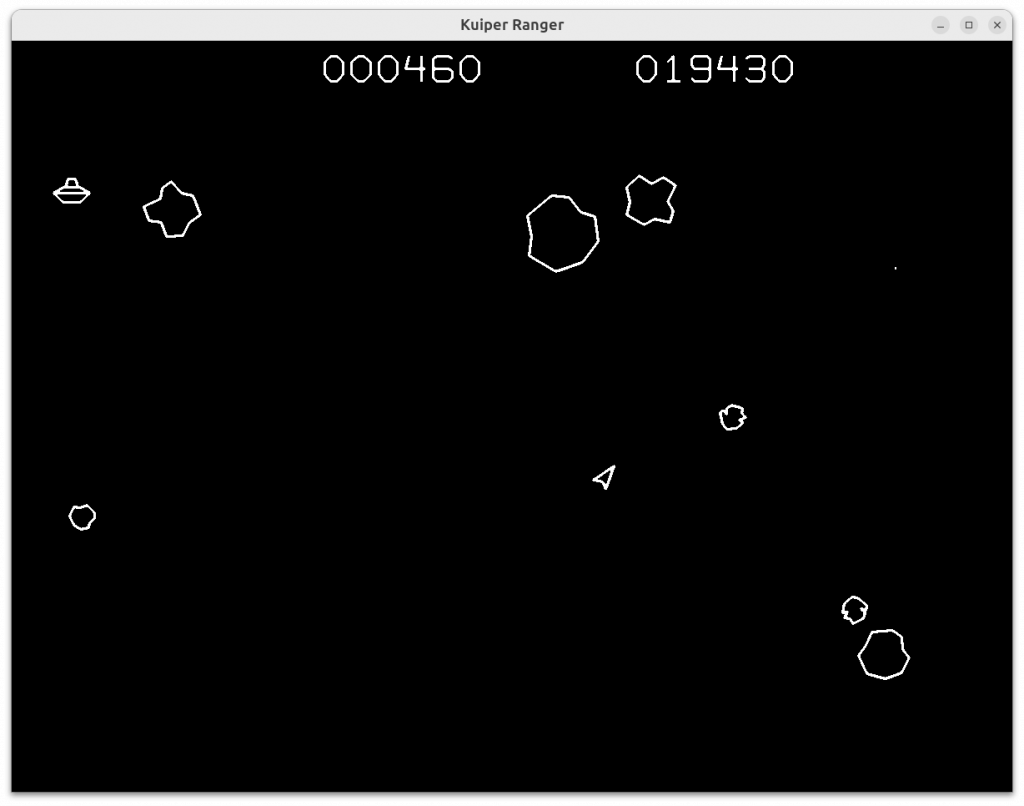
I resurrected an old game that I had written in college along with a couple of friends there. AI helped me port it to a bunch of platforms and get it published.
Origins
While I was at Carnegie Mellon in 1988, two friends and I collaborated on writing an Asteroіds arcade game knock-off. The game, called aster, was written in C and tried to adhere to strict object-oriented rules where every object, even simple ones such as 2D points, had to be accessed exclusively through accessor functions and macros. Back then, math was slow and floating point was unthinkable. It used exclusively fixed-point integer math (16.16), including trig that was implemented using the CORDIC algorithm.
It ran initially on Sun 2 workstations by memory mapping the sunbw black and white bitmap graphics frame buffer and drawing lines using the Bresenham algorithm. Then it ran on the suncg6 color-mapped monitor (8 bits/pixel = “bytemap”), although it still used only black and white, as it still does today. It had some primitive sound effects even at this early stage. Graphics were also very slow, so to move an object the game erased it by redrawing it in black, then redrew it at its new position. Flickering was not visible, as objects were moved quickly enough, one at a time.
Next it was ported to the DECstation 3100 with bytemap. Its MIPS CPU was really fast and the game played very smoothly in real time. It was like night and day. If I recall correctly, Zalman Stern did that.
When I worked at IBM after college, it was ported to a few IBM displays including the IBM RT/PC (AIWS), Megapixel, APA16 on the HFT (“high function terminal”). Some of the platforms even had rudimentary sound, supported by a simple sound API.
By 1993 it had been ported to the X Window system. At that point, all the other raw display implementations were dropped, along with sound support. The X11 support allowed it to run on virtually every relevant Unix-based platform at the time. It was renamed to xaster. Various work continued at random intervals through 1999 when version xaster-1.17 was done. After that, it sat untouched for a quarter century.
AI Project
In 2025, I decided it would be a good project to use as a vehicle for learning AI technology for software development, with the ultimate goal as having it run in a web browser in an HTML5 canvas. That seemed like a big task, so I broke it down into several steps:
- Converted to C++17 so it could remain object-oriented while removing the verbose macro accessors and beautifying the code. AI was actually not very helpful for this at all. It couldn’t do seemingly simple tasks like converting function prototypes from K&R style to ANSI. This ended up being a largely manual process, by which time I was questioning the wisdom of doing it. Ultimately, the result was pleasing. While I love C and have used it since I was a teenager, after 40 years of malloc’ing blocks of memory to implement and re-implement basic data structures ad infinitum, I’ll gladly take things like std::vector and std::map.
- The Plot module and the Input modules always had strictly-defined APIs to abstract graphic drawing and keyboard input. But they really assumed a fixed 4:3 display with static resolution (X11 full screen mode only). I knew it eventually needed to run in a variable-sized window with dynamic resizing. At that point I replaced all the fixed-point arithmetic with floating point, and replaced CORDIC with libm. All object positions are now done assuming a fixed “virtual” window size of 1280.0 x 960.0. Objects are scaled to the actual window size at drawing time. In order to maintain a 4:3 aspect ratio, the drawing area is letterboxed with gray horizontal or vertical borders when needed.
- Next, I considered sound. The legacy code still had calls to the Sound API spread throughout, so that API just needed to be implemented. AI suggested using the SDL2 library for that. Then something quite incredible happened. I wrote sound.hpp, a header file declaring API function definitions like init(), term(), play a sound specified by an enum (fire, explode, etc), start a continuous sound (thrust, alien) and stop it. Each function had a comment specifying in detail exactly what the API should do. I believe it was Anthropic Claude 4.5 that I was using from vscode when I asked that the API be implemented. Boom! It wrote sound.cpp, complete with waveform generators and a waveform mixer, which compiled without error and the damn thing suddenly had sound! This can’t be what “vibe coding” is, can it? It seems more significant than that.
- Now, the sounds were kind of crappy. I used AI further to generate better kinds of sounds. For example, I had it create a band-pass filter that I could apply to the output of its noise generator. I had it improve the decaying sinewave sounds and the alien siren sound. The sound was getting pretty respectable!
- I’m embarrassed to say it was only at this point that I realized SDL2 was actually a complete and popular cross-platform graphics library for gaming, and not just a sound interface. Letting AI pick the sound package had taken me out of the loop. But at this point the path became clear. I’d replace all X11 graphics with SDL2, and then the application would run on any Linux, whether X11 or Wayland, plus Windows, macOS, and probably other platforms for almost no effort.
- But before undertaking all of this, I knew I needed to reorganize the code structure into a typical event-driven game loop. It required refactoring mainly the top level of code into a couple levels of nested state machines. Finally I had an outer loop that looked like:
while(1) { UpdateGameState; UpdateDisplay; ProcessInputs; }
where the UpdateDisplay code is expected to regulate the frames-per-second rate. - I had AI do most of the conversion to SDL2. It ripped out the X11 code and replaced it with SDL2 code, which unbelievably worked the first time. I’m still reeling over that actually happening. Next, I spent a considerable amount of extra time getting the window resizing and full screen mode that had worked under X11 to work seamlessly under SDL2. I used AI often for hints (RIP StackOverflow). I was delighted to replace that Imakefile with a Makefile, removing the last vestige of the X11 legacy. SDL2 under X11 actually worked better than raw X11 under X11, because SDL2 has vertical sync support. Under X11, there had been some tearing during graphics updates, but SDL2 did not have this problem.
- SDL2 fully supports compilation under the Emscripten tool chain for Web Assembly (WASM). My game should theoretically run in an HTML5 canvas in a web browser! I used hints from AI to get the Emscripten cross compilation tools installed and create a skeleton HTML page to call it from. I had the whole thing running in a web browser within maybe an hour. With a little more work, dynamic window sizing was handled, and even Full Screen Mode! Yet again I was blown away by the existence of such technologies (SDL2 and Emscripten among them) that just work, and the ease of following AI instructions to download it and get it done 5x faster than if I had to research and configure these tools from scratch.
In vscode, I experienced seeing this: AI ran the build command in the terminal, saw that the Makefile it had generated went into an infinite loop spewing output, recognized the problem, fixed the Makefile, ran the build command again and had it succeed with a binary. The only thing I was doing was pressing an OK button to allow it to run each command. At the rate technology is progressing, it won’t be but a few months before the programmer can be out of the loop entirely. And once it’s able to learn dynamically, it’ll be a full-on programmer. Then it’ll be writing code we can’t even understand, and that’s probably the cusp of the Singularity.
Publication
At this point I had visions of publishing these results and decided it might be advisable to rename it so it would be less likely to get a take-down request from the trademark holder. Roid Ranger sounded good to me, but AI advised rather insistently that Roid is too similar. Plus there are already games called that anyway. I had it list 20 possible names, but they were meh. I suggested to it my second idea Kuiper Ranger, and it wrote a two-page essay about how much it loved that and why. So that’s how it got its current name.
I needed an old-timey style “box cover” for the game. Just a couple of prompts later into Gemini and I had it. Two years ago I’d have had to contract out for an artist to get this type of thing. Of course that would never have happened. I would have either had nothing, or some talentless primitive stick figure drawing. Now, everyone’s a great artist.

Debian package
It wasn’t hard generating and following instructions to create a Debian package that can be installed and removed on any Debian-based Linux distribution such as Ubuntu. I also created a local package repository so the apt tools would see it.
The hard part is getting the package into the upstream Debian repository so that it will eventually filter down and become available in many of the standard Linux distributions. The process involves generating all the correct control files, filing an ITP (intent to publish) bug report, and apparently, searching across the chats and forums for someone to “sponsor” the package and help usher it into the repository.
Microsoft Store
Visual Studio has an app publication plug-in that organizes an app for packaging and submission to the Microsoft Store. It didn’t take much time to have that all working. For some reason, around 52 sizes of icons and images are needed. I scaled the box cover image down to around 100×100, and for sizes below that, used the game’s space ship as a simple icon.
Kuiper Ranger is now live on the Microsoft Store. But getting it there is still only part of the work. Nobody will ever find it or download it unless pains are taken to popularize it far and wide.
Future
I’ll need to update this page as I complete additional phases of this project. These are basically more learning projects below. Then I can wash my hands of this project and maybe use AI for something useful.
- Porting to Mac OS.
- Keeping secure high scores for the on-line version. Anti-cheat is quite an undertaking for games that run entirely on client machines. It’s doable, but the only secure method I know of is to have the game log every detail of play (RNG seed, what buttons were down each frame) for the entire game, then send that history up to the server, which then “replays” the game internally at hyperspeed to verify the score. But we know what comes next: someone uses AI to write a super Kuiper Ranger player.
Now run it (it’s so easy there is no excuse not to!)
Here is as link to the on-line browser Web Assembly version. Be sure to press S to turn on the sound! Also, be sure to use a large window or just press F to enter or leave full screen mode! While you can start the game on a phone or tablet, a keyboard is necessary to play the game.
